A rundown of the latest EducateMe feature releases, product enhancements, design updates, and important bug fixes.
We are introducing the Knowledge Hub gives you a structured space to publish folders and articles with tag-based access and built-in AI assistant.
We’ve launched Trainio AI Roleplay activity in EducateMe to bring lifelike, AI-powered simulations into your training experience.
We've added two new interactive answer types to quizzes: Matching the Pairs and Ordering to make quizzes more dynamic and engaging.
Add interactive flashcards to your courses to help learners retain key concepts with ease and boost their engagement with the new activity.
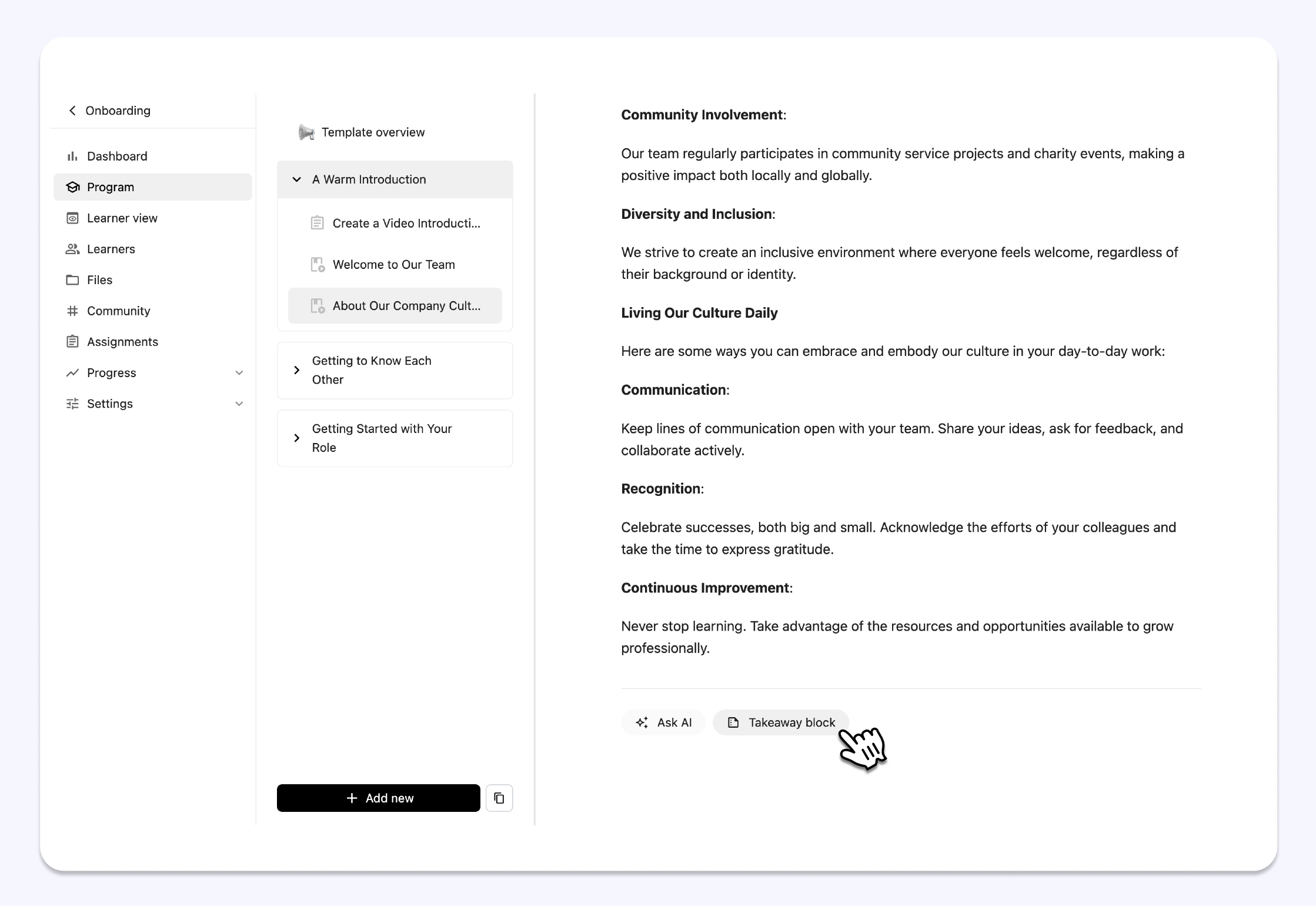
.png)
Takeaway blocks in lessons help learners focus on key insights and action points by highlighting the most important information. These blocks make content easier to scan, improve comprehension, and boost retention of essential takeaways.
We’ve just launched a new AI-powered feature that lets you instantly generate transcripts, subtitles (in 16 languages), and English-only video summaries and chapters, making it easier than ever for learners to navigate, understand, and interact with course content.
Learning just got easier with our new Ask AI feature, and learners can now get instant explanations and support right inside the platform, whenever they need it.
A new “All with access” tab in Learners page now lets you easily see everyone enrolled in your course, including those added via Libraries and Learning Paths.
Easily manage compliance training with recurring courses using EducateMe’s updated dashboard: track learner progress, completion rates, and overdue activities.
Set up automation in the settings by defining the timeframe, deadline, and initial expiration date to ensure timely course resets and reminders. Automation helps you reduce manual work and keep learners consistently up to date.
Set and enforce completion timelines for self-paced content. Deadlines automatically track from assignment dates and trigger email reminder notifications at key intervals.
Gain deeper visibility into course performance with new metrics tracking completion rates, time spent, and deadline adherence across all self-paced courses.
Monitor library-wide performance with aggregate reporting on completion rates, pass/fail statistics, and learner progression trends across all contained courses.
Create structured learning journeys for your learners. Assign courses in a specific order, set rules for progression, and guide learners through a seamless educational experience.
We’ve enhanced our certificate builder to make it easier to create and issue certificates. Upload custom tamplate and personalize certificates with dynamic variables.
Streamline your course management with new automations. Schedule course suspensions, send emails, and assign tags based on triggers like course completion or learner inactivity.

Enhance the visual appeal of your activities with custom covers! Upload your own images or select covers from Unsplash to make activities more engaging.

Control learner progression — set minimum score requirements, limit attempts, and ensure learners meet the criteria before progressing to the next activity.

Create invitation links that automatically assign tags to learners when they join. This makes it easier to segment and manage your audience and enroll them to Course libraries or Learning paths.
・4 bug fixes: enhanced stability and reliability.
・3 UI/UX improvements: smoother navigation, cleaner layouts, and a more user-friendly experience.
Share ideas on how to improve EducateMe →
Our new AI writing assistant helps you refine, summarize, or expand your text directly in the editor. With a few clicks, you’ll produce polished, engaging course content.
Our AI scheduling tool simplifies complex event and lesson planning. Just provide a prompt — like scheduling December events excluding holiday dates — and it will organize your activities automatically.
Create quizzes in seconds — simply paste your questions, and the AI instantly builds your quiz on the platform. No more manual formatting required!

Present PDF files like slide deck within your courses, keeping learners engaged without ever leaving the platform.
.png)
A cleaner, more intuitive feedback page now includes the option to export filtered feedback, making it easier to analyze and share learner insights.
Try out our new “Linked learning spaces” to copy courses between connected learning environments in just a few clicks, streamlining content sharing across your organization.
.png)
Assign tags to learners automatically when they join via your invitation link, seamlessly segmenting your learners as they enroll.

Enable or disable feedback for all activities at once in the course settings.
・7 bug fixes: enhanced stability and reliability.
・8 UI/UX improvements: smoother navigation, cleaner layouts, and a more user-friendly experience.
Share ideas on how to improve EducateMe →
Track all course activities and monitor each learner and teammate in real time.

The ‘Form’ activity enables quick feedback collection, allowing you to gather insights and responses directly within the EducateMe without relying on external tools.
Test out ‘Form’ in your course →

Embed Google Drive videos directly into your lesson content, making it simple to share multimedia resources with your learners.
Embed Google Drive videos to your lessons →

You can choose to show content before or after the event, giving you the flexibility to share resources when they’ll be most useful for your participants.
• Fixed 6 bugs 🐞
• Launched 43 UI/UX improvements 🚀
Share ideas on how to improve EducateMe →

It is now possible to create different course libraries and customize their visibility based on the tags assigned to learners, or make them accessible to all participants in the learning space.
Personalize the text of invitation emails for your learning space or course.


To improve insights, we’ve added the capability to display detailed analytics for individual learners based on their progress in multiple courses
・Removed the restriction on editing the quiz after learners submit it.
・Added the "Re-do" column for the learner role.
・Fixed the ratio of the player for uploaded and embedded videos.
・Updated access to comments in the assignment on mobile for learners.
・Connected the messenger channel to a course.


