
LMS Reporting: 11 Reports and 6 Metrics to Track in 2026

By Sofia KondratSofia KondratCorporate Training Expert & Content EditorHey there! I’m Sofi Kondrat, your go-to corporate training advisor here at EducateMe. I’ve been navigating the highs…Read more
Corporate Training Expert & Content Editor
12 min read
Every quarter, someone in leadership asks "how's training going?" and every quarter, L&D sends back a completion rate. Leadership nods. Nothing changes.
Completion rate is the metric that ends conversations instead of starting them. Here's what to track instead, and what those numbers should actually make you do.
LMS reporting collects and presents learner data — enrollments, completions, assessment scores, engagement, and compliance status — so teams can act on what training is working. Six metrics drive most decisions: completion rate, assessment score progression, module drop-off, time-to-competency, certificate expiry pipeline, and engagement by module type. Healthy completion runs 90%+ for mandatory compliance training, 50-70% for optional upskilling. What separates platforms most is whether managers can see their team's data without an admin pulling a report.
What LMS Reporting Actually Covers
LMS reporting is the process of collecting, organizing, and presenting learner data from your learning management system — enrollments, completions, assessment scores, engagement, and compliance status — so teams can see what training is working and act on what isn't.
It's a foundational capability that most teams still judge by proxy: 91% of L&D pros say continuous learning matters more than ever, yet employee engagement and retention remain the most common way teams measure whether development is working (LinkedIn Workplace Learning Report). Engagement and retention are downstream signals — not learning data.
Before getting into the metrics that matter, it's worth being clear about what LMS reporting and analytics encompasses, because different platforms draw the line in different places.
- Standard learning management system reports cover learner-level data: who enrolled, who completed, who passed or failed an assessment, and when. Every platform produces these. They're necessary but not sufficient.
- LMS analytics goes further: trends across cohorts, score progression over time, module-level drop-off, skill gap detection, and correlation between training completion and performance outcomes. This is where the useful decisions live, and where platforms diverge significantly.
- Learning management system data analysis at the advanced end connects LMS outputs to business metrics: time-to-competency for new hires, certification compliance by department, training ROI. Most mid-market platforms don't reach this level natively; some require a BI tool integration or API export to get there.
Knowing which tier you're working with matters before you set expectations for what your reporting can do.
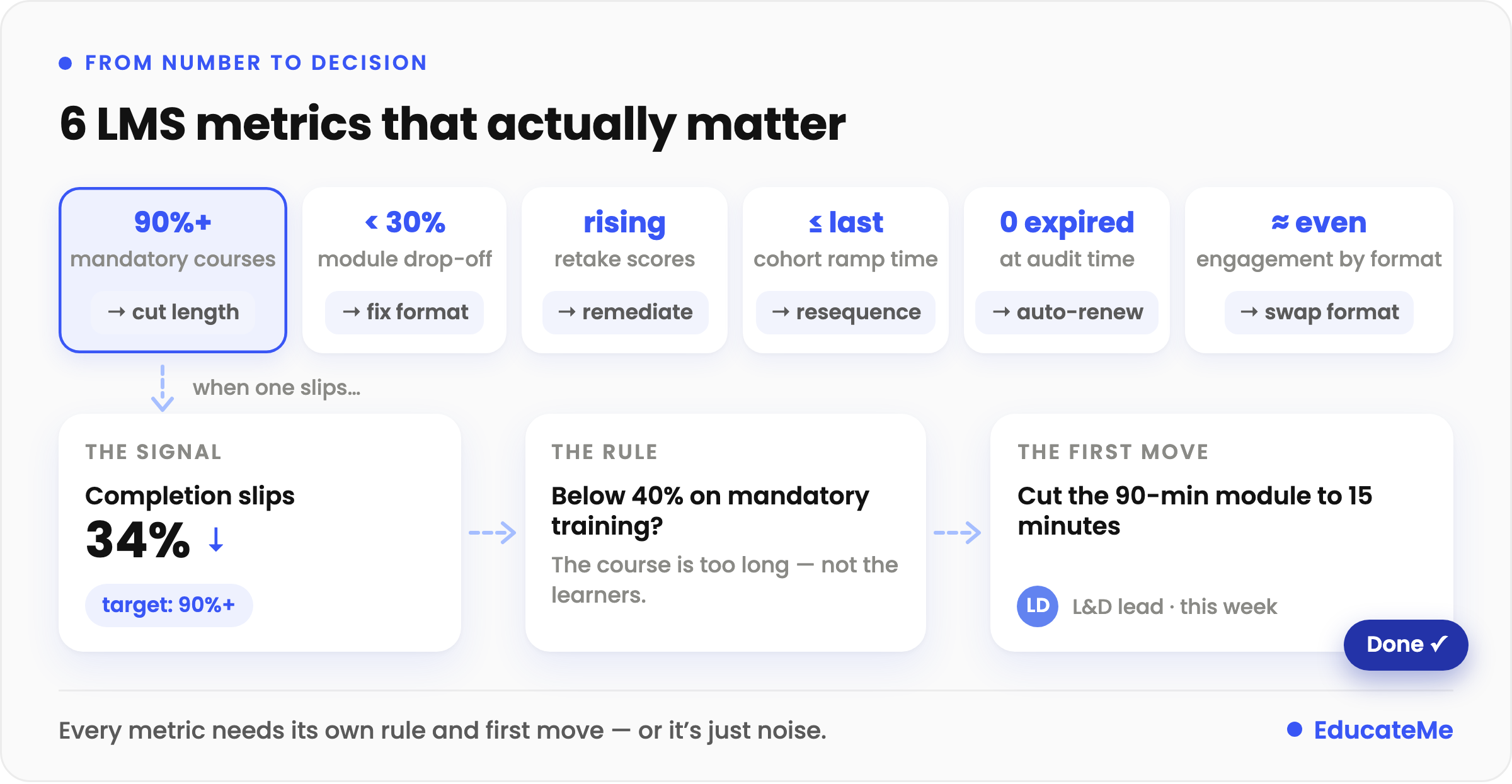
6 LMS Metrics That Actually Matter, and What to Do With Them
Here's a framework I'd actually use. Each metric below covers what it measures, what a reasonable benchmark looks like, and (most importantly) what to do when the number is off.
Metric 1: Course Completion Rate
What it measures: The percentage of enrolled learners who finish a course.
Rule of thumb: 90%+ for mandatory compliance training. 50–70% for optional upskilling content. Anything below 40% on mandatory training is a flag worth investigating immediately.
When the number is bad: The instinct is to blame the platform or the learner. Usually it's neither. Low completion on mandatory training typically means one of three things: the course is too long for the context (a 90-minute SCORM module assigned to a frontline team with 20 minutes of desk time per day), the content isn't relevant to the learner's actual role, or automated reminders aren't firing. Fix the content length first. Fix the reminder workflow second. If completion is still low, the content itself needs a look.
What to watch for in the data: Completion rate broken down by cohort or team is more useful than a platform-wide number. If completion is 80% overall but 35% for one department, that's a management problem, not a content problem.
Metric 2: Assessment Score Progression
What it measures: Whether scores improve across multiple attempts, or across cohorts over time.
Rule of thumb: Scores should increase meaningfully on retakes — learners who failed once and retried should be passing at a higher rate. Across cohorts, average first-attempt scores should be stable or improving as content gets refined.
When the number is bad: Flat scores on retakes (where learners take the same assessment three times and score roughly the same) mean the content between attempts isn't teaching anything new. That's a design flaw, not a learner failure. The fix is to add targeted remediation: if a learner fails the product knowledge module, route them to a specific resource before they retake, not back to the full course.
What to watch for in the data: Assessment score analytics at the question level, not just the module level. If 70% of learners get question 7 wrong, that question is either badly written or covering something the course doesn't explain well.
Metric 3: Module Drop-Off Rate
What it measures: Which specific modules learners abandon before completing.
Rule of thumb: No single module should see more than 30% of learners drop off before completing it.
When the number is bad: High drop-off on one module is almost always a format or length problem. A 25-minute video in the middle of an otherwise interactive course will lose people. So will a dense text module that requires three scrolls to reach the first interactive element. I'd look at time-on-module first — if learners are spending 90 seconds on a module designed for 15 minutes, they're not reading it, they're clicking through it.
What to watch for in the data: Drop-off rate per module, paired with average time-on-module. Both together tell you whether learners are abandoning (closing the tab) or rushing (clicking through without engaging).
Metric 4: Time-to-Competency
What it measures: How long new hires take to complete onboarding training and reach their first meaningful performance milestone — first solo customer call, first independent task completed, first sale closed. It's the number SHRM tracks as time-to-productivity, and it moves with onboarding design more than with the individual hire.
Rule of thumb: This one varies too much by role to give a universal number. Benchmark against your own previous cohort. If the last group took 6 weeks and the current one is tracking toward 9, that's a signal worth investigating before the cohort finishes.
When the number is bad: Extended time-to-competency usually means either the training content doesn't map closely enough to actual job tasks, or the sequencing is wrong — learners are completing modules in an order that doesn't mirror how work actually unfolds on the job. I'd audit the learning path sequence against a real week-one job description. They often don't match as closely as L&D teams assume.
What to watch for in the data: Time-to-competency per cohort, not per individual. Individual variation is expected. Cohort variation (one intake taking significantly longer than the last) points to something systemic: a change in role complexity, a change in the content, or a difference in how managers are supporting training completion.
Metric 5: Certificate Expiry Pipeline
What it measures: How many active certifications expire in the next 30, 60, and 90 days, and whether re-enrolment is already triggered.
Rule of thumb: Zero expired certifications at the time of an audit. The goal isn't zero expirations ever — it's that every renewal is caught and completed before it lapses. Where a standard requires training "at least annually," OSHA reads that as a hard 365-day ceiling — which is why the report has to surface the expiry date itself, not just a pass/fail status.
When the number is bad: Usually it means automated re-enrolment isn't set up, or the reminders are firing too late. A reminder sent 7 days before expiry on a 4-hour compliance course gives the learner no realistic time to complete it. I'd set the pipeline at 60 days for anything over 2 hours, and 30 days for shorter refreshers. The report should make the upcoming expiry pipeline visible by default, not something you have to filter to find.
What to watch for in the data: Expiry date distribution across your learner base. If 60% of your certifications expire in the same quarter every year, your compliance risk is concentrated rather than spread. That's worth restructuring.
Metric 6: Learner Engagement by Module Type
What it measures: How engagement (time spent, interaction rate, completion) varies across content formats: video, text, quiz, assignment, live session.
Rule of thumb: No universal number, but engagement should be consistent across formats within the same course. If video modules average 90% completion and text modules average 45%, you have a format mismatch.
When the number is bad: Low engagement on a specific format tells you that format isn't working for this audience. A field sales team with limited desk time will disengage from long text modules. A technical team that learns by doing will check out of passive video. The fix is format substitution, not more content.
What to watch for in the data: Engagement by format segmented by team or role. A format that works well for one audience may be wrong for another within the same organisation, and blended reports hide that.
LMS Reporting Capabilities: Platform Comparison
Not every LMS gives you the same access to these metrics. Here's how the main platforms compare on reporting specifically.
| Platform | Standard reports | Custom report builder | CSV/Excel export | Manager view (no admin needed) | API / BI tool access |
|---|---|---|---|---|---|
| EducateMe | Yes — score pages, activity tracking, assignment progress, feedback reports | Advanced filtering by learner cohort, metadata, and time period | Yes | Yes — real-time cohort dashboards with completion, engagement, and performance data | API available |
| TalentLMS | Yes — completion, progress, scores | Limited | Yes | Branch-level reporting for managers | API available |
| Docebo | Yes — extensive standard report library | Yes — custom report builder | Yes | Yes — configurable manager views | Yes — API and BI integrations |
| Absorb LMS | Yes — customisable dashboard | Yes | Yes | Yes | API available; BI tool support |
| 360Learning | Yes — engagement and completion focused | Limited | Yes | Limited | API available |
| Cornerstone | Yes — compliance and skill tracking | Yes — advanced | Yes | Yes | Yes — enterprise BI integrations |
| Sana Labs | Yes — AI-powered dashboards | Yes — real-time custom dashboards | Yes | Yes | Yes |
| LearnUpon | Yes — standard completion and progress | Limited | Yes | Portal-level reporting | API available |
The columns that separate platforms in practice: the manager view and the custom report builder. If every reporting query requires an admin to pull a report, your managers will stop asking,. and your visibility into training outcomes drops to what the monthly all-hands slide deck shows. That's too late to be useful.
How LMS Reporting Is Changing in 2026
For years, LMS reporting meant pulling last month's completion numbers. In 2026, four shifts are moving it from a rear-view mirror to a decision engine.
- AI-driven analysis. Instead of reading dashboards, teams increasingly ask questions in plain language and let AI surface the pattern, which cohort is slipping, which module predicts drop-off. It's the biggest gap in most reporting suites today, and the fastest-moving.
- Skills and competency data. Completion is giving way to capability. Reports now map training to specific skills and expose gaps by role — and employees are already ahead of the reporting — 36% now use AI to learn new things, much of it invisible to the LMS.
- Predictive signals. Leading platforms now flag at-risk learners and expiring certifications before they become problems, not after.
- BI and AI integration. Learning data no longer stays trapped in the LMS — it exports to BI tools, syncs with HRIS, and increasingly can be queried directly by AI assistants through open APIs.
11 Essential LMS Reporting Examples for Effective Training
Most LMS platforms offer a version of these. What varies is the depth, the filtering options, and whether the data is accessible to the right person without admin involvement.
#1. Course Performance
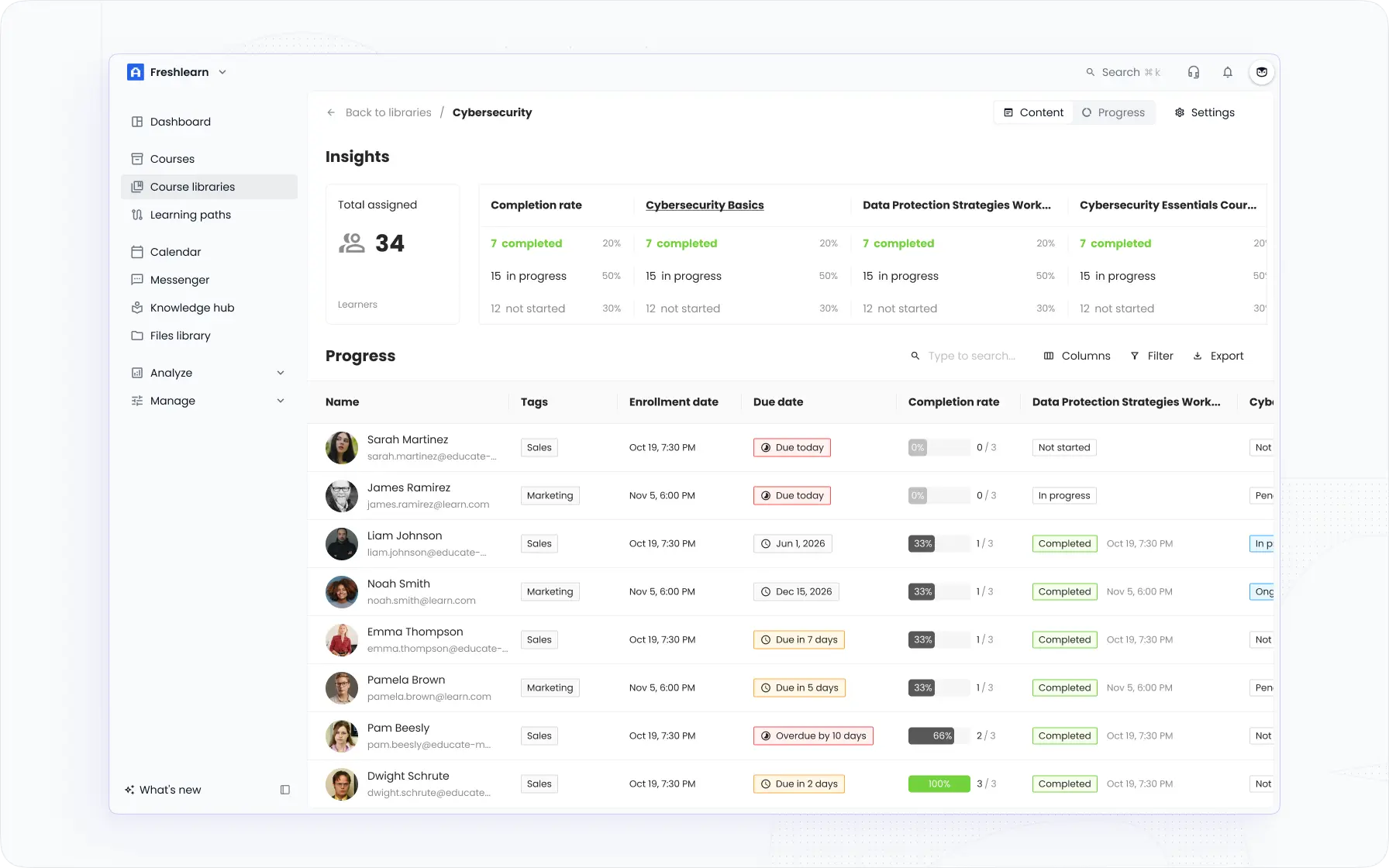
A course report evaluates the modules, programs, and coursework. It considers the participants who enrolled in the course and those who passed or failed. Collected data is analyzed to determine if the course is excessively challenging, not challenging enough, or if it is achieving the desired objectives.
💡Who needs it: Curriculum designers, educational methodologists, course instructors, and LMS administrators. It provides valuable insights into student performance, course completion rates, and the overall impact of the curriculum on learners.
#2. Learners Engagement
Usually, a learner engagement report contains several dashboards and analytics to help you measure the active participation level and learners' involvement rate. It provides insight into how users interact with the material, their interests, the topics they search for, and the most commonly asked questions.
Several key LMS metrics can measure engagement rate, including the number of views, time spent studying, time spent in the LMS, percent of content viewed, and percent of completed lessons/modules.
💡Who needs it: Educators, course designers, educational methodologists, and administrators. It helps in tailoring educational content to suit learners' needs and interests better.
#3. Cohort Progress
Cohort progress reports serve as the main instruments to assess the status and performance of a team or group. They offer invaluable insights into how the group is advancing and pinpoint opportunities for enhancement.
Without consistent progress updates, it becomes challenging to truly understand a group's achievements truly and to make well-informed decisions. Thus, it's important to prioritize the use of cohort progress reports, keeping the team aligned and working towards its objectives.
💡Who needs it: Team leaders, project managers, and educators who oversee group activities and performance. They are particularly valuable for organizations, educational institutions, or teams aiming to monitor and improve collective progress toward shared goals.
#4. Individual Learner Progress
This report monitors metrics specific to each individual, including attendance, course completion, and assignments. This type of LMS report captures the learning transcripts for each student and can be shared with the learner to evaluate their progress. In essence, this report focuses on the student.
💡Who needs it: Educators, trainers, coaches, and administrators who are looking for personalized learning approaches and want to ensure that students meet course expectations and milestones.
#5. Assessment Results
The Assessments Report gives you to review all assessments in your LMS. You can use this report to assemble and compare high-level information about your assessment activities. Moreover, a good LMS system provides you with the option to drill down further on group & individual learner assessments for more detailed information.
💡Who needs it: Educators, trainers, and administrators. It's especially useful for those responsible for curriculum design, assessment creation, and performance tracking.
#6. Satisfaction Rate
The Satisfaction Rate LMS Report, often derived from learner feedback and survey results, evaluates the overall user experience within an LMS. It identifies aspects of training that resonate with learners and areas that require improvement.
In other words, it offers qualitative insights into learner satisfaction, helping organizations to gauge the effectiveness of their training programs, support, instructors, and other elements of the learning process.
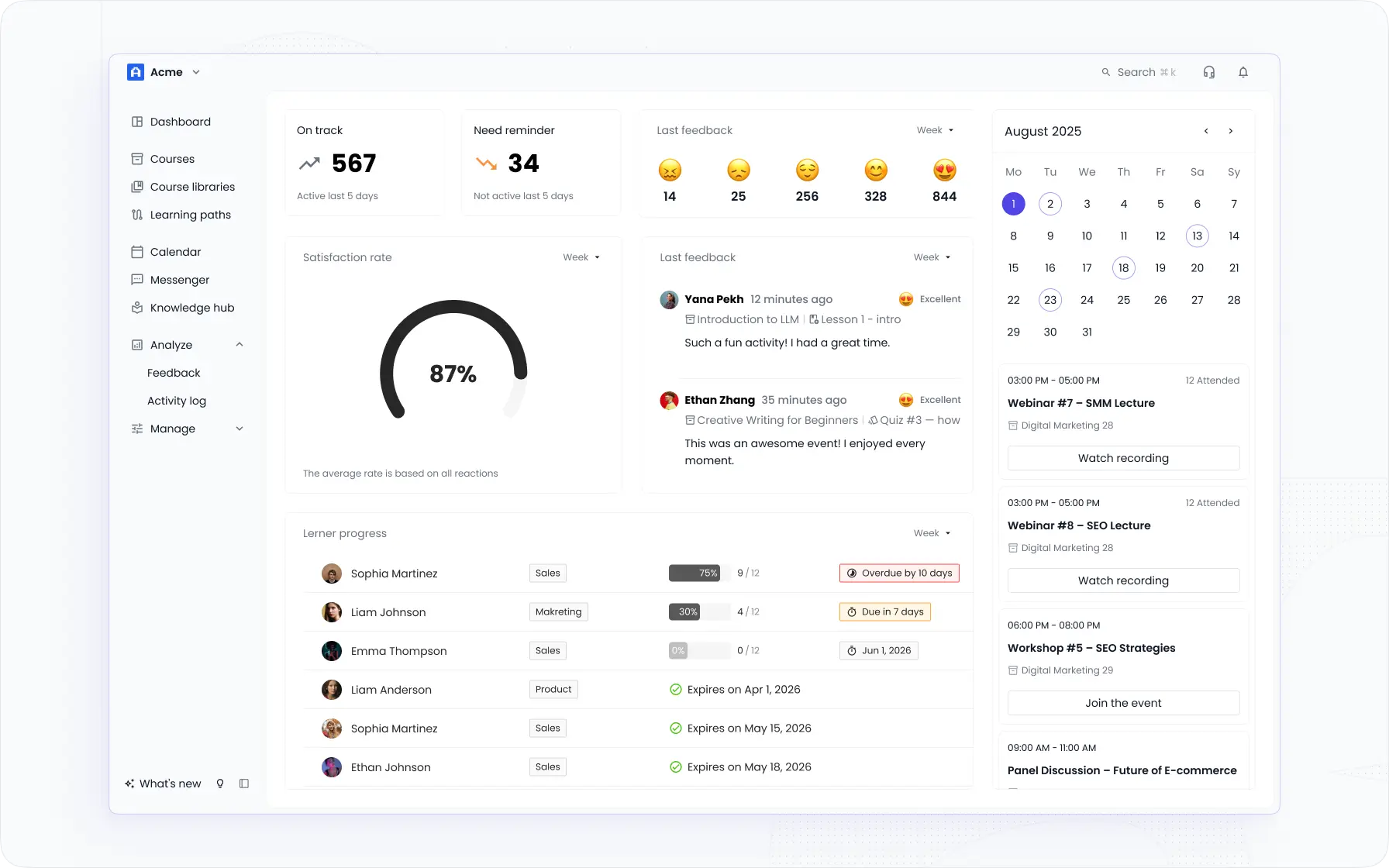
💡Who needs it: L&D managers, teachers & instructors, and organizations that are in the stage of LMS implementation.
#7. LMS System Report
This category collects comprehensive data, including individuals and courses, showcasing how participants interact with the system. In addition to courses, the system reports the social interactions between learners and provide you with sufficient data to rate the system using various gauges.
Moreover, you can filter the reports based on distinct criteria.
💡Who needs it: Organizations implementing or managing an LMS, L&D teams, training managers, course creators, and LMS providers.
#8. Certification Tracking
Certification tracking reports monitor employee completion of mandatory compliance training. They identify who has the required certifications and who needs to catch up.
This is especially crucial in industries with strict regulatory standards, such as healthcare, Finance, and Law. This helps ensure regulatory compliance and timely training completion.
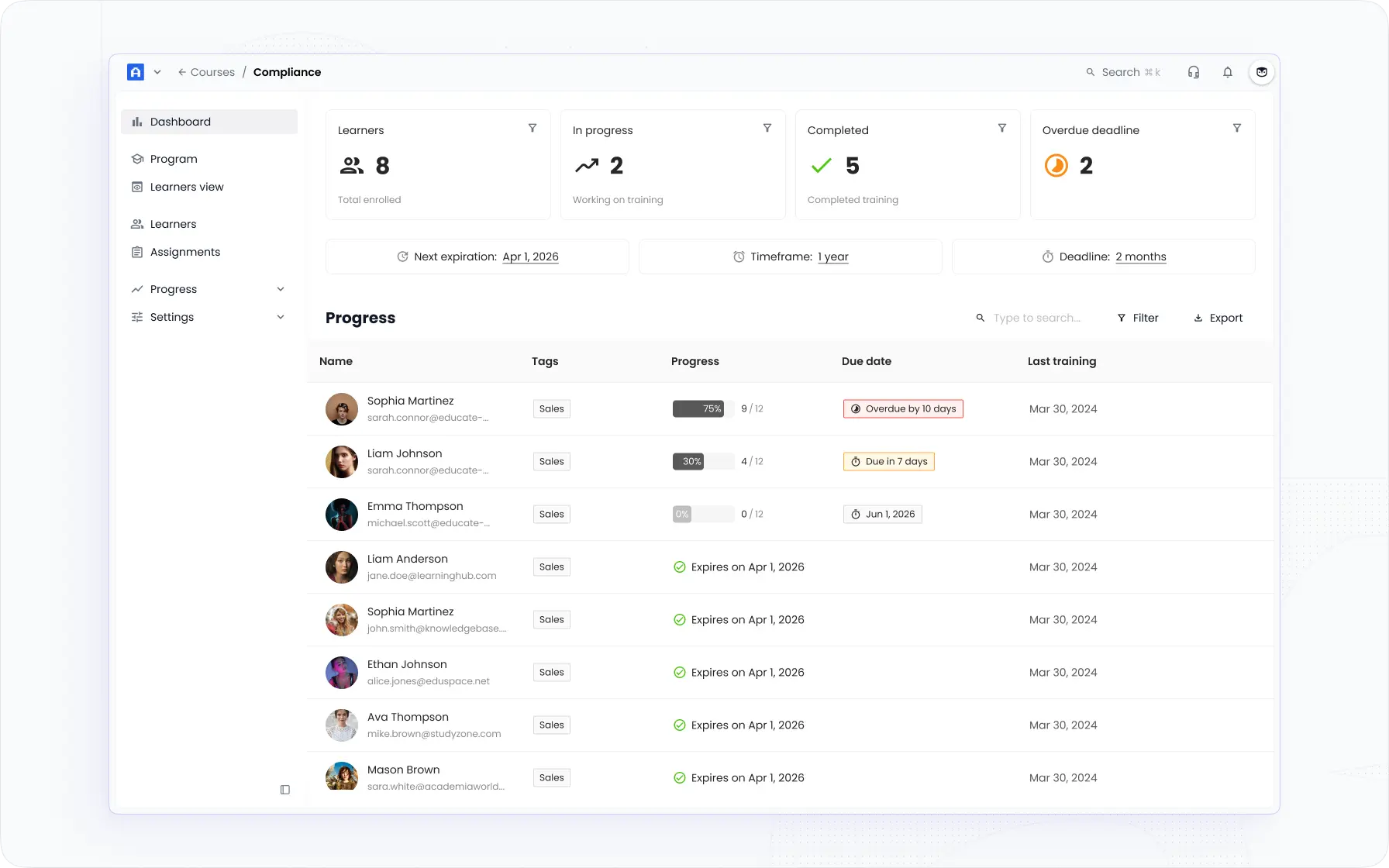
💡Who needs it: HR managers, compliance officers, and others who are responsible for relying on certification tracking and ensuring all employees meet mandatory training requirements.
#9. Resource Utilization Report
Resource utilization reports offer detailed insights into how learning resources, including videos, documents, quizzes, and interactive modules, are being utilized within the LMS. These reports track metrics like access frequency, time spent on each resource, and user feedback on resource effectiveness of resources. By analyzing this data, organizations can determine which resources are most valuable and which may need improvement or replacement.
💡Who needs it: Curriculum designers, instructional designers, LMS administrators, and educators. It is particularly beneficial for those responsible for resource allocation and content optimization within the LMS.
#10. Skill Development Report
Skill development reports focus on tracking and analyzing the acquisition and improvement of specific skills through LMS training programs. These reports assess how well learners are developing the competencies required for their roles, based on their performance in relevant courses and activities.
💡Who needs it: HR managers, training and development professionals, team leaders, and educational methodologists. It's particularly valuable for organizations focused on skills-based learning and development.
#11. Activity Log
Monitor all course activities and gain insights into each learner’s and teammate’s actions in real time. This detailed log lets you track every action taken by course participants and filter data by activity type, learner tag, or specific time periods.
💡 Who needs it: Instructors, administrators, and managers who want a comprehensive overview of learner engagement and activity trends.
How to Build an LMS Reporting Workflow That Gets Used
The reporting strategy I've seen work consistently is built on three practices, not ten.
1. Decide in advance what each report should trigger. Before you set up any LMS data analytics view, write down: "If completion rate drops below X, we do Y." If you can't complete that sentence, you don't need that report yet. Reports without a decision attached are noise.
2. Give the data to the person who can act on it. A completion rate dashboard visible only to the LMS admin is not a management tool. It's an archive. The manager whose team's completion is dropping needs to see that data, without filing a request for it.
3. Review on a fixed cadence, not on demand. Monthly is usually right for most training metrics. Weekly is appropriate for active onboarding cohorts. The review should take 20 minutes — a quick scan of the six metrics against their thresholds, with flagged items actioned before the next session.
Key Takeaways
- LMS reports are only useful if they're connected to a decision. Build your review cadence around a specific set of metrics with pre-defined action thresholds.
- The six metrics that drive the most useful decisions: completion rate, assessment score progression, module drop-off, time-to-competency, certificate expiry pipeline, and engagement by format.
- Completion rate benchmarks: 90%+ for compliance, 50–70% for optional content. Below 40% on mandatory training means something is wrong with the content or the delivery context — not the learner.
- The reporting feature that separates platforms most in practice: whether managers can see their team's data without an admin pulling a report for them.
- Advanced LMS analytics — skill gap detection, cohort trending, BI integration — is only available on some platforms. Verify what tier you're working with before setting stakeholder expectations.
How EducateMe Empowers You with Learning Reporting
Reporting is only useful when the person who can act on it can see it. EducateMe is built around that: real-time dashboards showing completion, engagement, and performance by cohort — visible to managers without an admin pulling a report.
Its reporting and analytics surface drop-off, learning velocity, and skill gaps across individuals and teams, with exportable reports and HRIS sync (BambooHR, Rippling, Paylocity, and more). Because it's AI-native, you can also query your learning data directly from tools like Claude or ChatGPT, so the answer comes to you instead of living in a spreadsheet.
If you're rebuilding how your team tracks training outcomes, start a 14-day free trial and see the reporting inside your own workflow.
Frequently asked questions
LMS reporting covers standard outputs: who completed what, when, and at what score. LMS analytics goes further — it identifies patterns across cohorts, tracks metric changes over time, and surfaces insights like which modules drive drop-off or which learner segments are falling behind. Most platforms provide both, but the depth of analytics varies significantly. Basic LMS reports tell you what happened; LMS data analytics tells you what to do about it.
For compliance specifically, the three non-negotiables are certification completion rate (target 100% before the audit window), certificate expiry pipeline for the next 90 days, and re-enrolment trigger status, confirming that automated reminders are firing before certifications lapse. Assessment pass rates matter too, but I'd look at first-attempt pass rate specifically: if most learners are failing the first attempt and passing on the second, the content is probably teaching to the test rather than to the actual competency.
It depends on the platform. EducateMe, Docebo, Absorb, and Cornerstone all support manager-level reporting views where team leaders can see their direct reports' data in real time without needing admin access. TalentLMS and LearnUpon offer branch-level or portal-level reporting that achieves a similar result. If your current platform requires every reporting query to go through the LMS admin, that's a meaningful bottleneck — managers stop checking data they can't easily access.
Start with drop-off data before changing anything. If learners are abandoning a specific module at a higher rate than others, that module has a problem — usually length, format, or relevance to the role. Shortening it or changing the format (video to interactive, text to checklist) is faster and more effective than a full course redesign. If completion is low across the whole course, check whether automated reminders are configured and whether the course appears in the learner's workflow at the right moment, a course that shows up in a new hire's queue on day one of a chaotic onboarding week will get ignored regardless of its quality.